
The WeldGrid platform
One platform for every weld, from drawing to handover.
Projects, drawings, materials, welds, inspections, heat treatment and handover records in one connected platform. Explore each module below.
- Projects & Clients
- Drawings, BOM & MTC 3.1
- Digital Welding Map
- Spool Management & Nesting
- Welding Management
- Weld Traceability
- NDT & Inspection
- Preheat & PWHT
- Quality Records
- Handover
01
Digital Quality Control & Engineering Automation
Projects & Clients Management
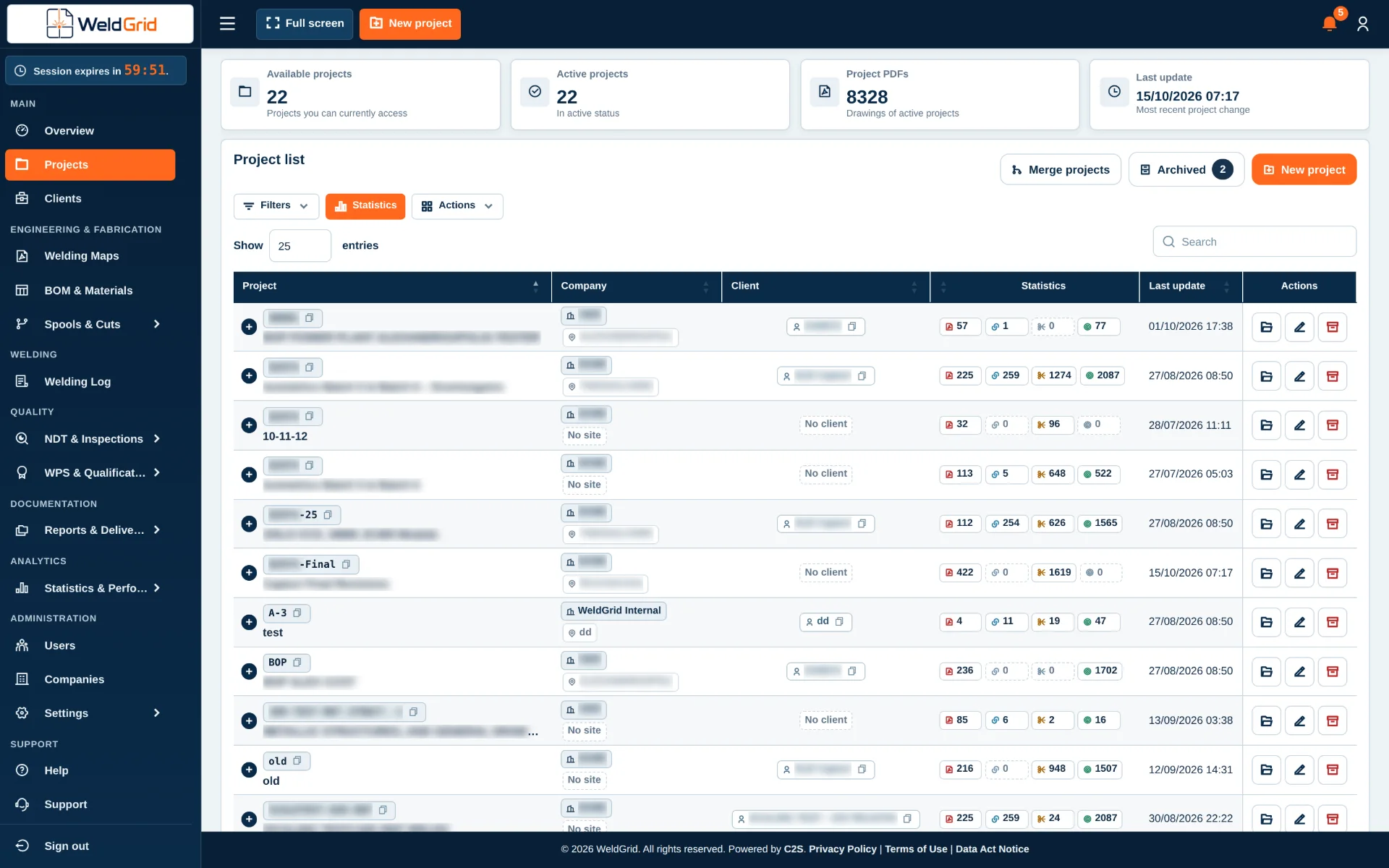
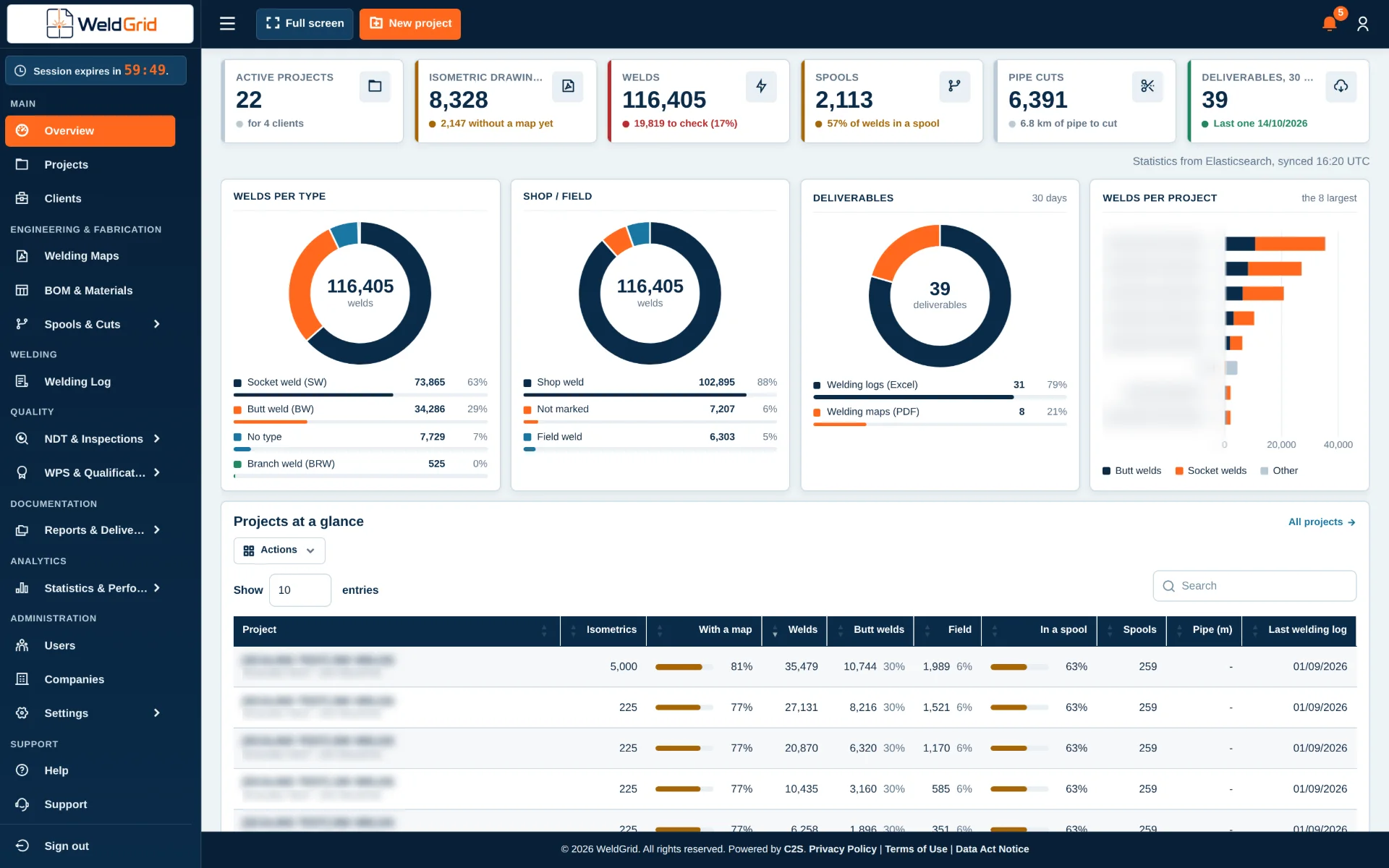
Manage multiple clients and projects from one centralized environment, with clear separation of project data and real-time visibility across the portfolio.
Managing industrial projects often means working with multiple clients, sites, drawing packages, technical records and distributed teams. In WeldGrid, the Projects & Clients Management environment acts as the central workspace for organizing this information, keeping drawings, BOM data, inspection information and quality records within the appropriate project context.
Project and management teams can move between projects while maintaining a consistent overall view of progress, inspections and open items. Project-specific configurations and access controls help ensure that users see the information relevant to their assigned work.
What it covers
- Client portfolio management
- Client-specific workspace organization
- Multi-project workspace segregation
- Project-specific access and permissions
- Global project progress visibility
- Centralized access to drawings, BOMs, inspection data and quality records
Who it is for
- Project Managers
- Operations Directors
- Quality Managers
- Site & Field Engineers
- Technical Teams
Key benefits
- Centralized project and client information
- Faster navigation between projects and sites
- Clear separation of project data and access
- Better visibility of project progress and open items
- A common source of project information for management and technical teams
Questions and answers
Can I organize multiple projects under specific clients?
Yes. Client profiles organize and associate multiple projects and their related project information.
- Client profiles. Each client has its own profile, with its projects, contracts and drawing packages linked to it.
- Project workspaces. Drawings, BOM data, inspection information and quality records stay within the right project.
- Portfolio view. Progress, inspections and open items can be followed across all projects of a client.
Can different projects have different specifications and standards?
Yes. Each project workspace is configured according to the requirements of that project.
- Codes and specifications. Design codes and client specifications are set per project.
- Material databases. Each project keeps the material data that applies to it.
- Permission groups. Users and their permissions are defined for each workspace.
How is access managed across clients and projects?
User roles and permissions are configured so that access matches the relevant client, project or site.
- Roles per client or project. Each user gets a role for the clients and projects they work on.
- Only what is relevant. Field engineers, quality inspectors or subcontractors see the documents and logs of their assigned site.
- Clear separation. Project data stays separated between clients.
02
Digital Quality Control & Engineering Automation
BOM Extraction & Material Management
Extract and manage BOM data, material certificates and Heat Numbers in one project environment, creating a traceable connection between materials and the relevant welding and fabrication records.
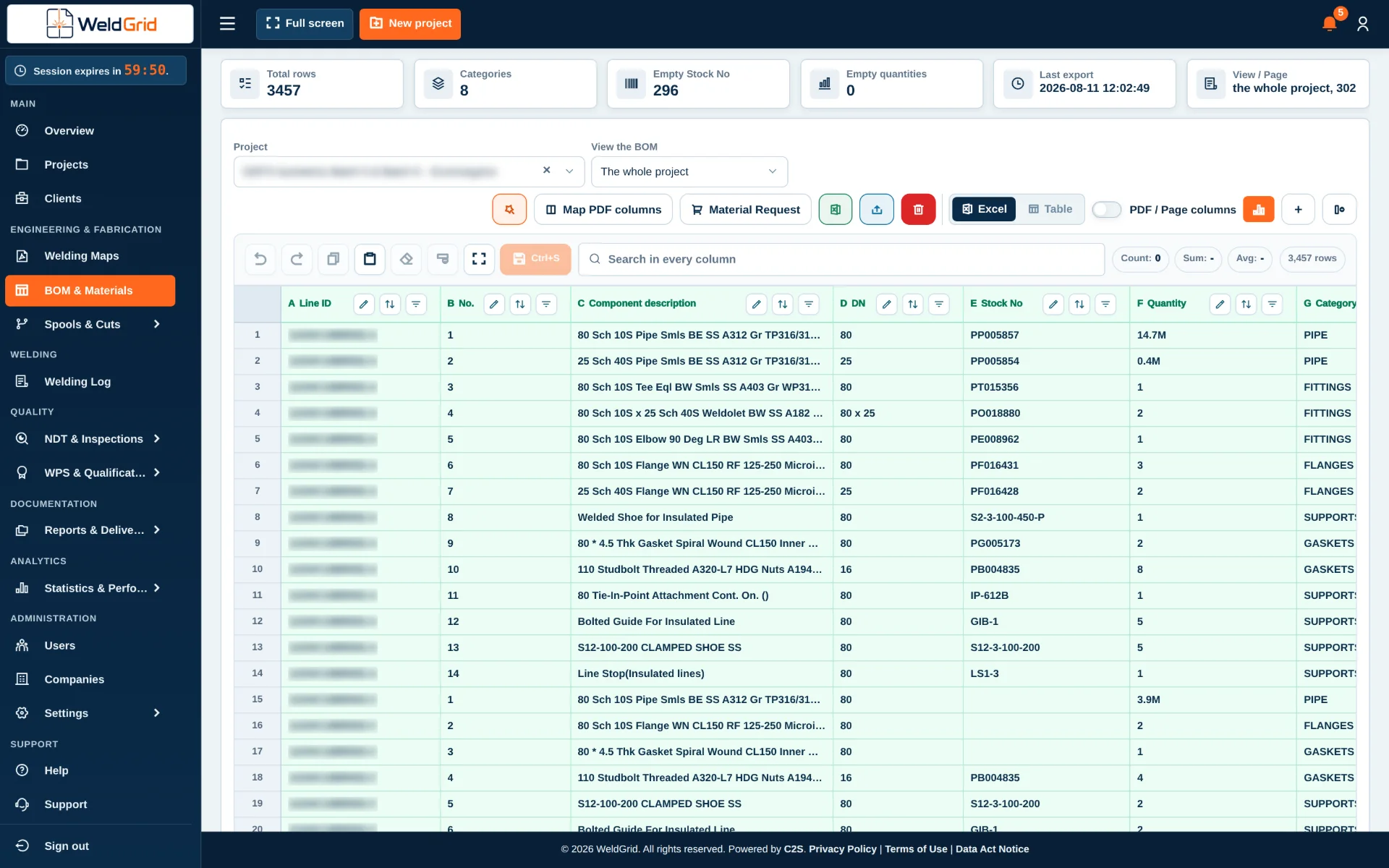
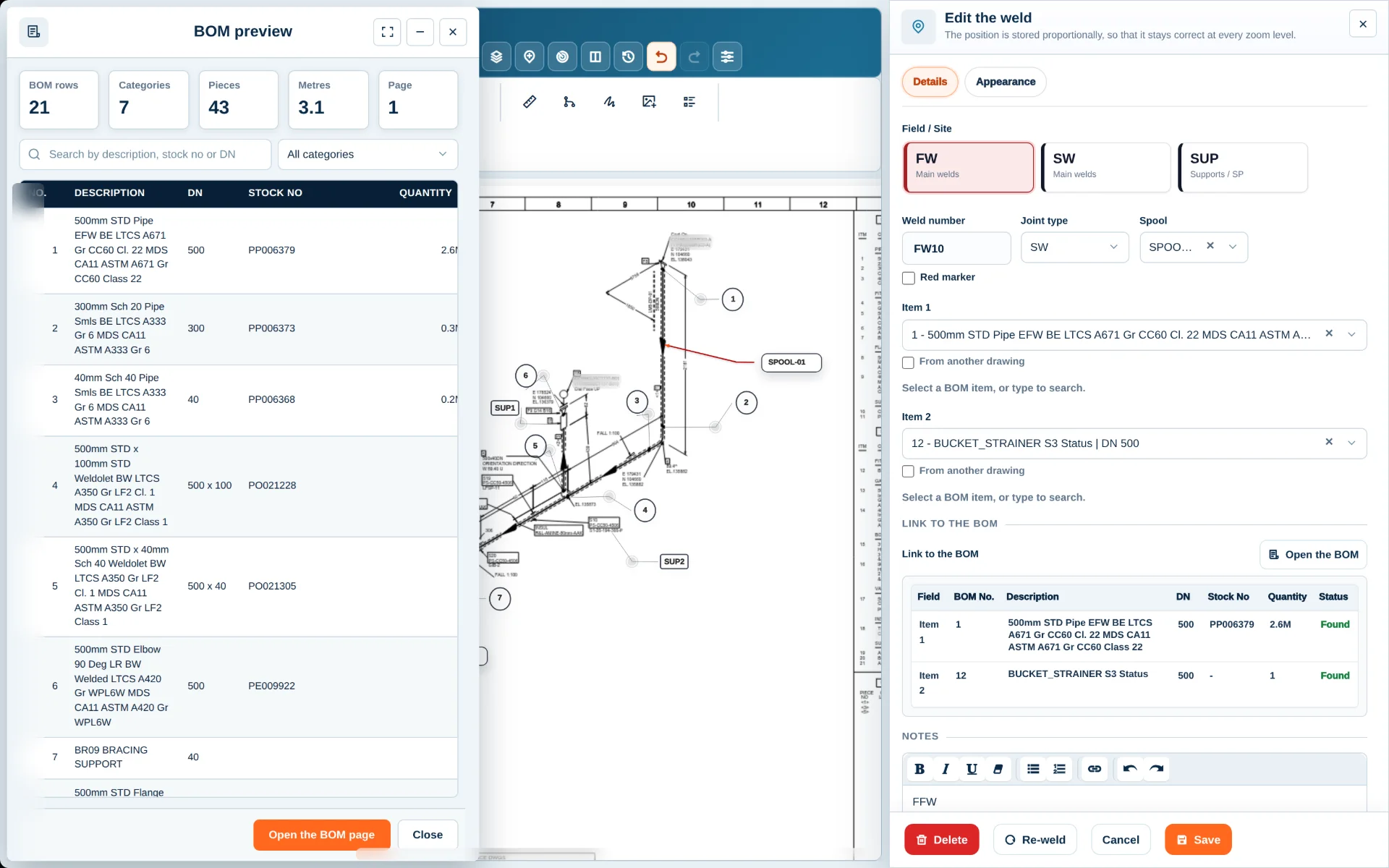
Manual transcription of material information from isometric drawings into spreadsheets can be slow, repetitive and prone to typing or quantity errors. BOM Extraction in WeldGrid reads and analyzes supported isometric drawings and converts the material information into structured project data.
Users can also upload and manage EN 10204 Type 3.1 Material Test Certificates (MTC 3.1), record the applicable Heat Numbers and associate each certificate with the corresponding material records. These Heat Numbers can then be linked to the relevant weld, spool and material logs, supporting material traceability from receipt and allocation through fabrication and final quality records.
What it covers
- Automatic BOM extraction from PDF isometric drawings
- Identification of item codes, quantities, dimensions and material specifications
- Structured material database creation
- Upload and management of EN 10204 Type 3.1 Material Test Certificates (MTC 3.1)
- Recording of Heat Numbers and association with the corresponding materials and certificates
- Linking of MTC 3.1 certificates and Heat Numbers to the relevant weld, spool and material logs
- Linking BOM data with line numbers and project records
- Integration with Welding Maps and Spool Logs
Who it is for
- Quality Engineers
- Erection Engineers
- Field Engineers
- Project Teams
Key benefits
- Significantly reduced manual data entry
- Fewer typing, quantity and part-number discrepancies
- Centralized MTC 3.1 certificate management
- Traceability between materials, Heat Numbers, certificates and logs
- Structured and reusable BOM information
- Better connection between drawings, material records, welds and spools
- Faster preparation of quality records and handover documentation
Questions and answers
What drawing files does BOM Extraction support?
BOM Extraction is designed to ingest and parse PDF isometric drawings that contain structured material information.
- PDF isometric drawings. The material tables on the drawings are identified and read.
- Captured data. Item codes, quantities, dimensions and material specifications.
- Structured result. The material information becomes structured project data, ready to connect with the rest of the project.
Can extracted BOM items connect with other WeldGrid modules?
Yes. BOM Extraction serves as the core material database of the system.
- Line information. BOM items are linked with their line numbers and project records.
- Digital Welding Maps. Weld information is connected with the BOM items of the drawing.
- Spool Logs. Materials stay connected with the spools they belong to.
Can MTC 3.1 certificates be uploaded and managed?
Yes. EN 10204 Type 3.1 Material Test Certificates are uploaded and associated with the corresponding material records.
- In the project. Certificates are kept in the same project environment as the materials.
- Heat Numbers. The applicable Heat Numbers are recorded and associated with each certificate.
- Traceability. From receipt and allocation through fabrication and final quality records.
Can Heat Numbers be linked to the project logs?
Yes. Heat Numbers recorded against materials and MTC 3.1 certificates are linked to the relevant logs, which supports end-to-end material traceability.
- Weld logs. Heat Numbers are linked to the relevant welds.
- Spool logs. Spools carry the Heat Numbers of their materials.
- Material logs. Material records stay connected with their certificates.
03
Digital Quality Control & Engineering Automation
Digital Welding Map
Create and manage customized digital welding maps directly from project drawings, with all relevant weld, material and project data connected in one environment.
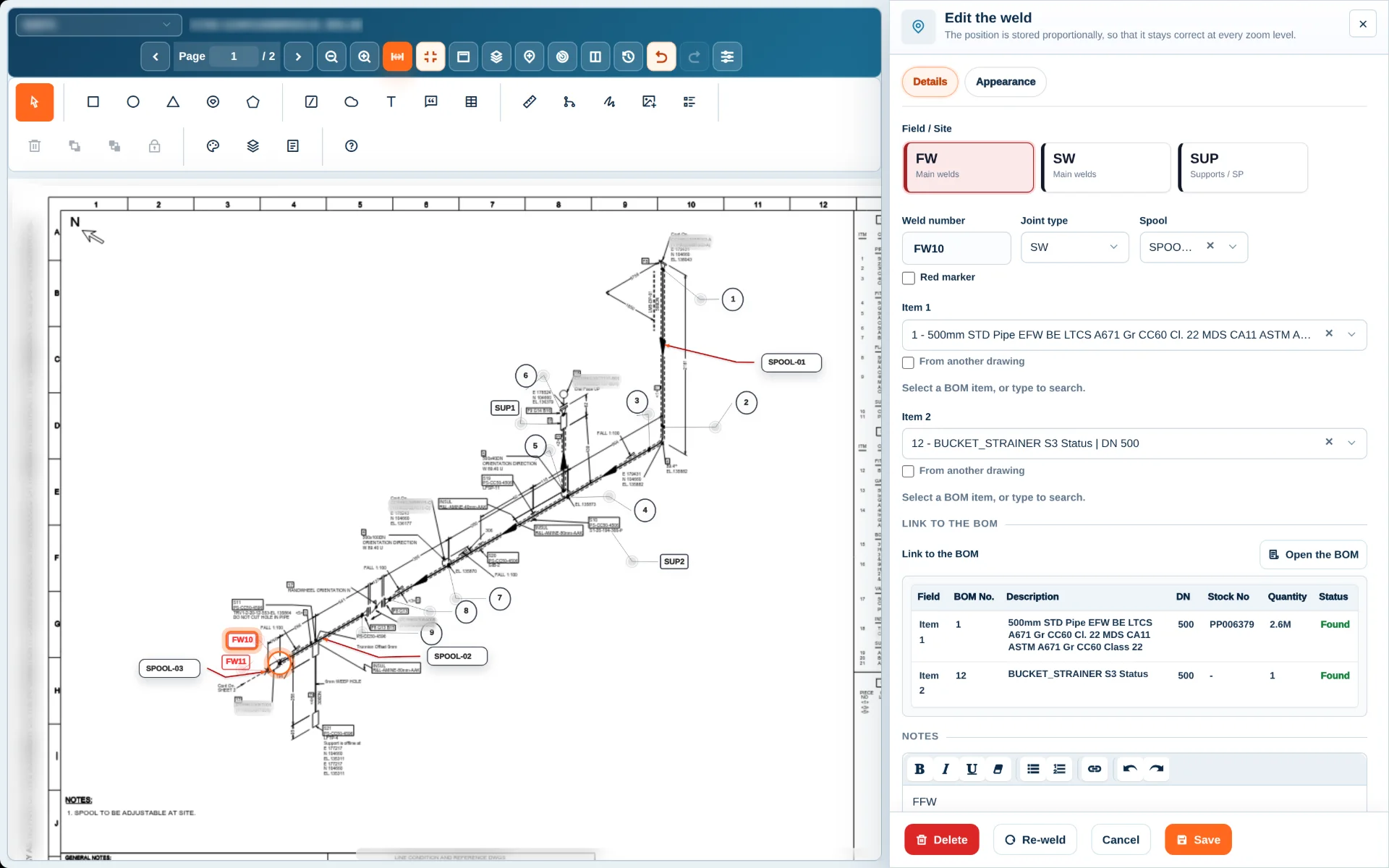
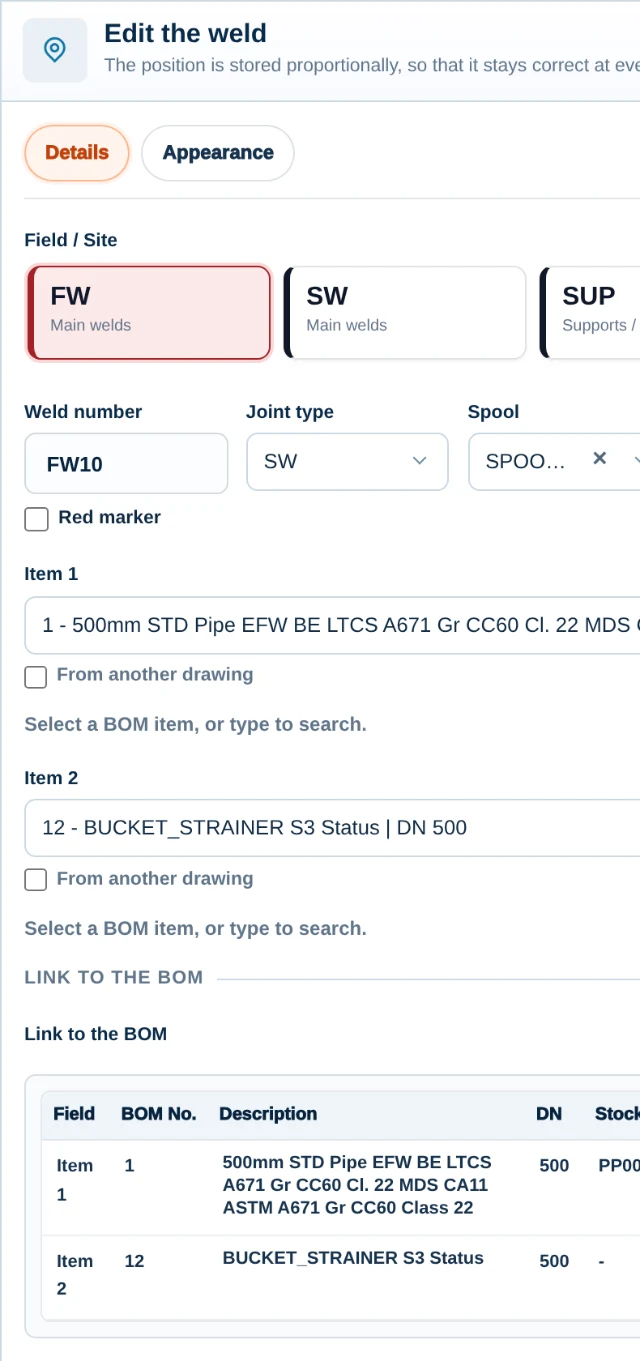
Traditional welding map management often relies on PDF files and manual data extraction into Excel spreadsheets, making the process time-consuming and prone to errors. The Digital Welding Map of WeldGrid transforms this workflow into a dynamic digital environment, connecting BOM information, Line ID, Drawing No. and the relevant line attributes with component and weld information in a single visualization.
The mapping environment also supports spooling, loose-material management, cutting lists and cut-offs, as well as redmarks, rewelds, comments and welding symbols. When drawing revisions occur, users can compare revisions and carry existing annotations forward for verification and adjustment.
What it covers
- Dynamic welding map creation and management
- Linking isometric drawing data with BOM, Line ID and drawing information
- Spooling and loose-material management
- Pipe cutting lists, nesting and cut-off management
- Redmarks, comments and welding symbols
- Drawing revision comparison and annotation carry-over
- Synchronization with weld traceability, spool logs and custom project data
Who it is for
- Quality Engineers
- Erection Engineers
- Field Engineers
- Project Managers
Key benefits
- Reduced manual data entry and documentation errors
- Faster creation and updating of welding maps
- Connected drawing, weld and material information
- Better coordination between field and office teams
- Improved project documentation and handover readiness
Questions and answers
Can I add redmarks and comments?
Yes. Redmarks, comments, notes and welding symbols are added directly within the mapping environment.
- Redmarks and rewelds. Field modifications are marked on the drawing itself.
- Comments and notes. Instructions stay where the team needs them.
- Welding symbols. Standard-compliant or free-style, as the project requires.
What happens when a drawing has revisions?
WeldGrid shows a side-by-side comparison between the revisions.
- Side by side. The old and the new revision are compared on one screen.
- Annotations carried forward. Existing annotations and marks move to the new revision for verification and adjustment.
- Connected data. Changes to drawing information can be reflected across welding maps, traceability records and spool logs.
What weld and joint types are supported?
The existing configuration supports standard industrial weld and joint classifications as well as project-specific definitions.
- Standard classifications. Common industrial weld and joint types are available from the start.
- Project-specific definitions. Custom types can be defined to match the code of the project.
Do I need to configure preferences for every drawing?
No. Preferences are saved once in the system settings and applied consistently across all drawings.
- Weld symbols. The shape and type of each weld symbol, for example a triangle for field welds.
- Numbering. Whether weld numbers use a prefix.
- Appearance. Size and colors of the marks.
- Joint types. The joint types used in the project.
04
Digital Fabrication, Logistics & Material Optimization
Spool Management & Nesting Planning
Track each spool from fabrication through inspection, release and transport, while keeping its location and accompanying loose materials visible and optionally optimizing material cuts from the MTO.
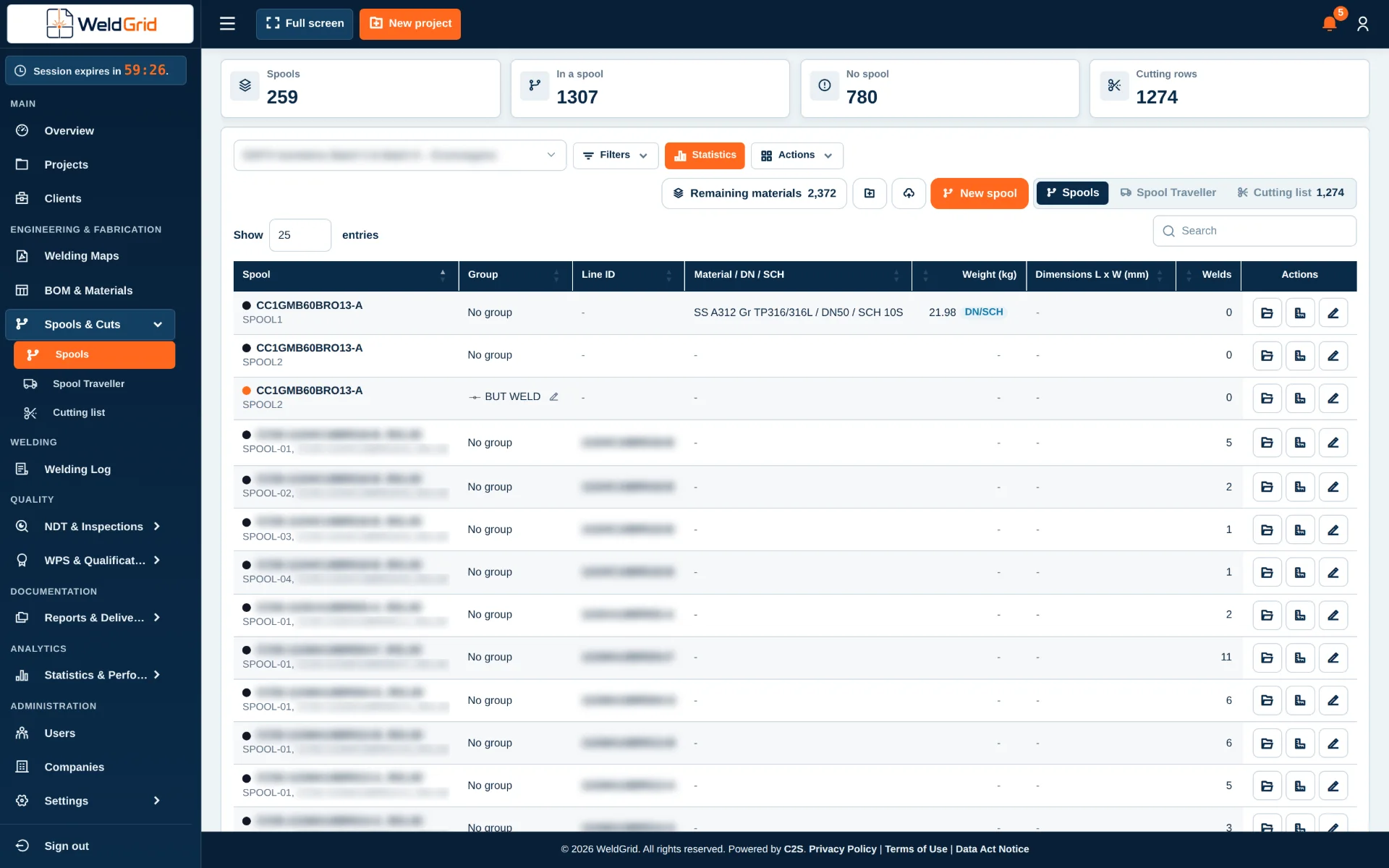
Spool coordination becomes difficult when fabrication status, inspection records, loose materials and transport information are maintained in separate files. The Spool Management & Nesting Planning module provides a centralized view of each spool, including its fabrication progress, current location, inspection status and readiness for release or transport.
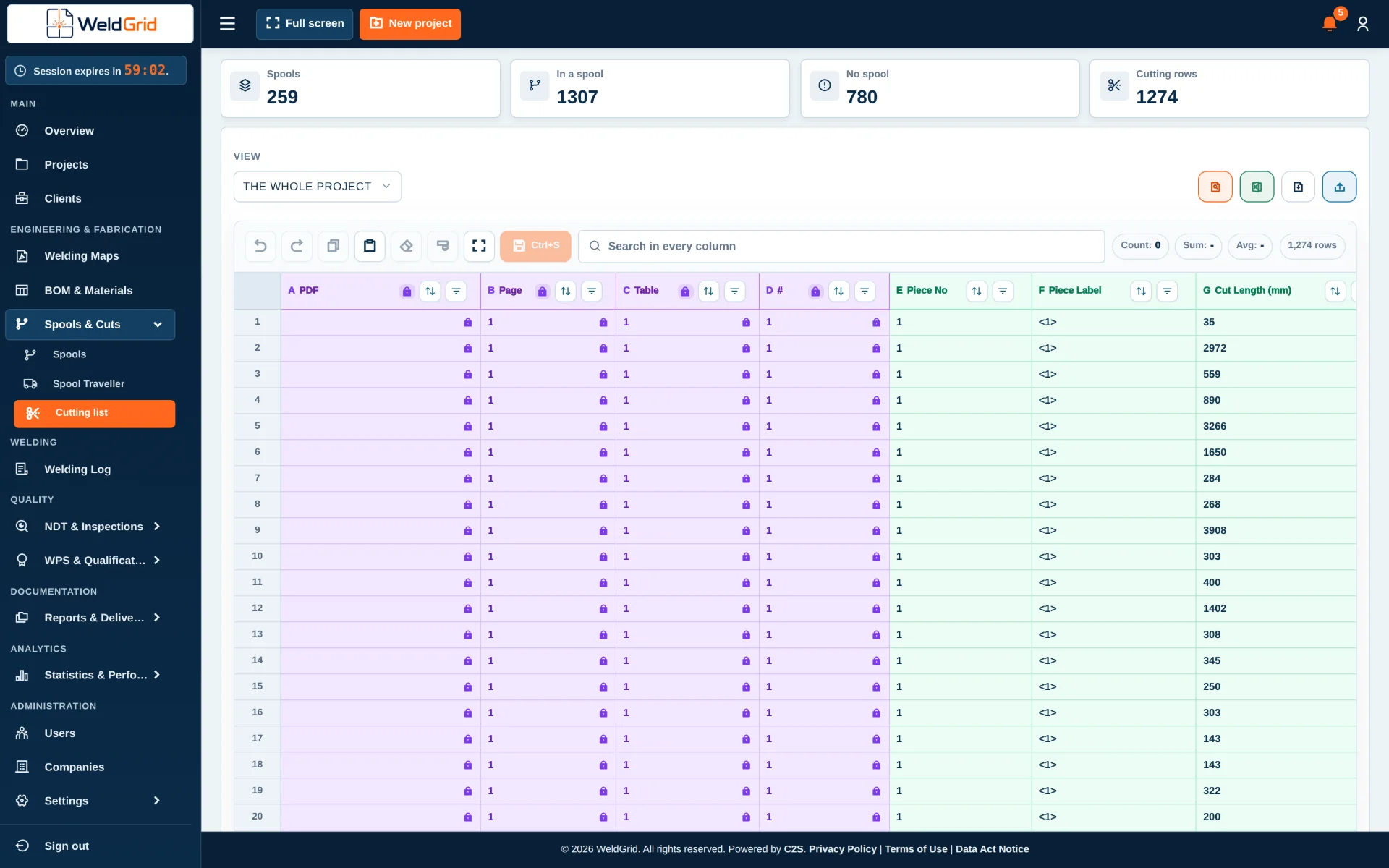
A spool can be identified as ready only after the required inspections and configured project release criteria have been completed. When required by the user, MTO information can support nesting plans and optimized cutting arrangements, which helps reduce offcuts and material waste.
What it covers
- Centralized spool register and status tracking
- Visibility of fabrication, inspection and release status per spool
- Transport-readiness control based on completion of required inspections and project-defined release criteria
- Tracking of spool location across workshop, storage, dispatch and site
- Management of loose materials accompanying each spool
- MTO-based nesting planning when selected by the user
- Preparation of cutting plans and optimized cuts to improve material utilization
- Connection with BOM/MTO, welding, NDT, PWHT and quality records
Who it is for
- Fabrication Teams
- QA/QC Departments
- Material Controllers
- Logistics & Warehouse Teams
- Site & Erection Teams
- Project Managers
Key benefits
- Real-time visibility of spool status and location
- Clear identification of spools ready for transport
- Release decisions connected to required inspection completion
- Better control of loose materials and dispatch completeness
- Optional MTO-driven nesting and cutting optimization
- Reduced material waste and improved coordination between workshop, quality, logistics and site teams
Questions and answers
How is a spool identified as ready for transport?
Readiness is determined from the completion of the required inspections and the release criteria of the project.
- Required inspections. All inspections required for the spool have been completed.
- Release criteria. The project-specific criteria configured by the user are met.
- Clear status. Spools ready for transport are clearly identified.
Can WeldGrid show where a spool is located?
Yes. The current location and movement status of each spool is maintained.
- Workshop. While the spool is fabricated.
- Storage. While it waits for release or dispatch.
- Dispatch and site. On its way to the site and after it arrives.
Can loose materials be tracked with a spool?
Yes. Loose materials that accompany a spool are recorded and checked as part of its dispatch preparation.
- Recorded per spool. Each spool lists the loose materials that travel with it.
- Checked before dispatch. Complete dispatch packages and fewer missing items at site.
Can WeldGrid prepare nesting or cutting plans?
Yes. When the user enables this workflow, MTO data supports nesting and optimized cutting plans.
- Based on the MTO. Material demand comes from the MTO of the project.
- Available stock. Plans take the applicable materials and the available stock information into account.
- Less waste. Optimized cuts reduce offcuts and material waste.
05
Digital Welding Engineering & Resource Management
Welding Management
Manage welding procedures, qualifications, consumables, gases and equipment in one connected environment, with clear validity, expiry, allocation and traceability controls.
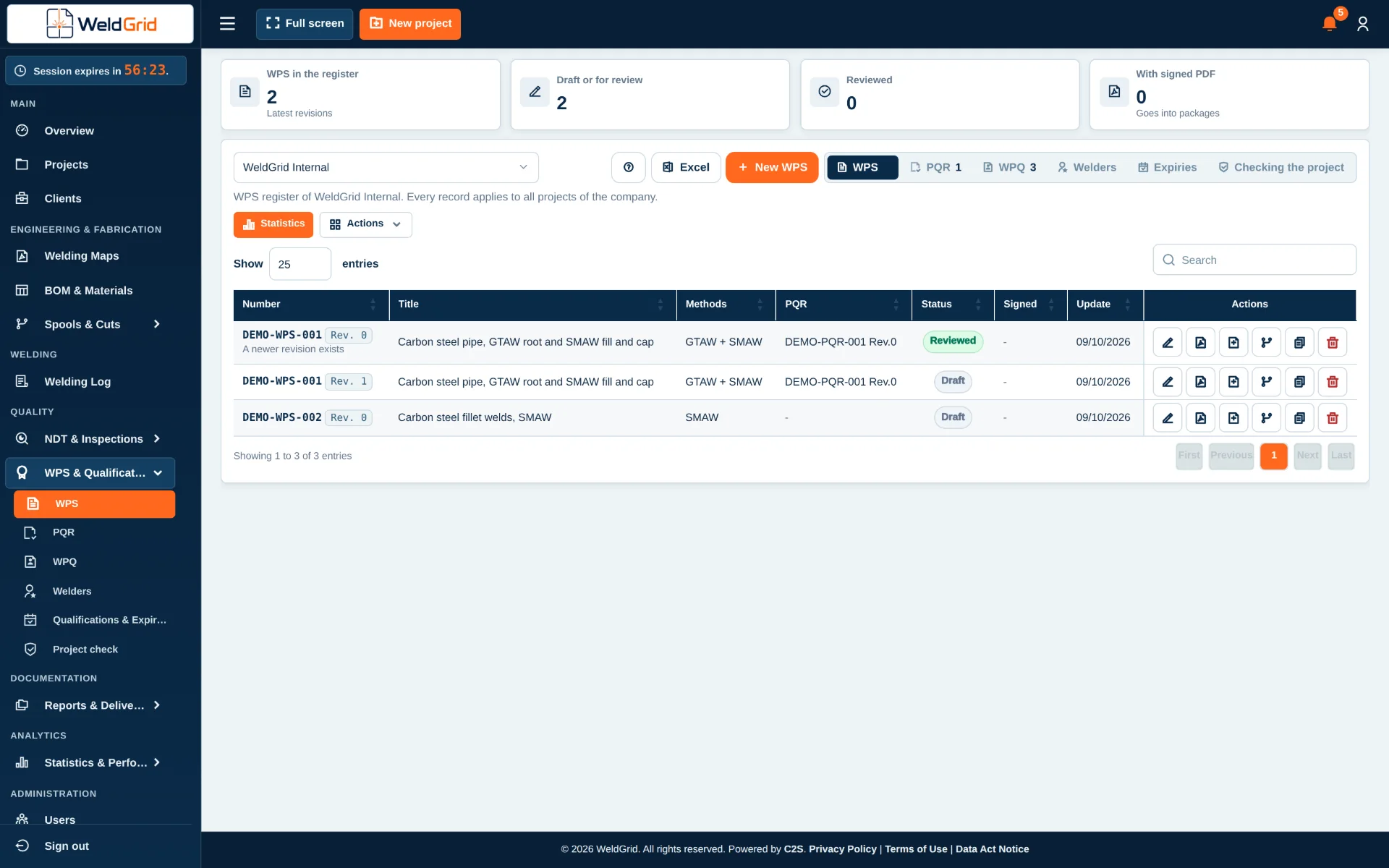
Welding management depends on more than recording completed welds. Teams must control approved procedures, supporting qualification records, welder qualifications and the resources used to perform the work. The Welding Management module brings these responsibilities under one connected environment.
Validity, continuity, revision and expiry information can be monitored so teams can identify which records are current, approaching expiry, expired or superseded. By connecting procedures, qualifications, consumables and equipment with project and weld records, WeldGrid supports a traceable view of how each welding activity was authorized and resourced.
What it covers
Welding engineering and qualifications
- Creation and management of Welding Procedure Specifications (WPS)
- Management of Procedure Qualification Records (PQR)
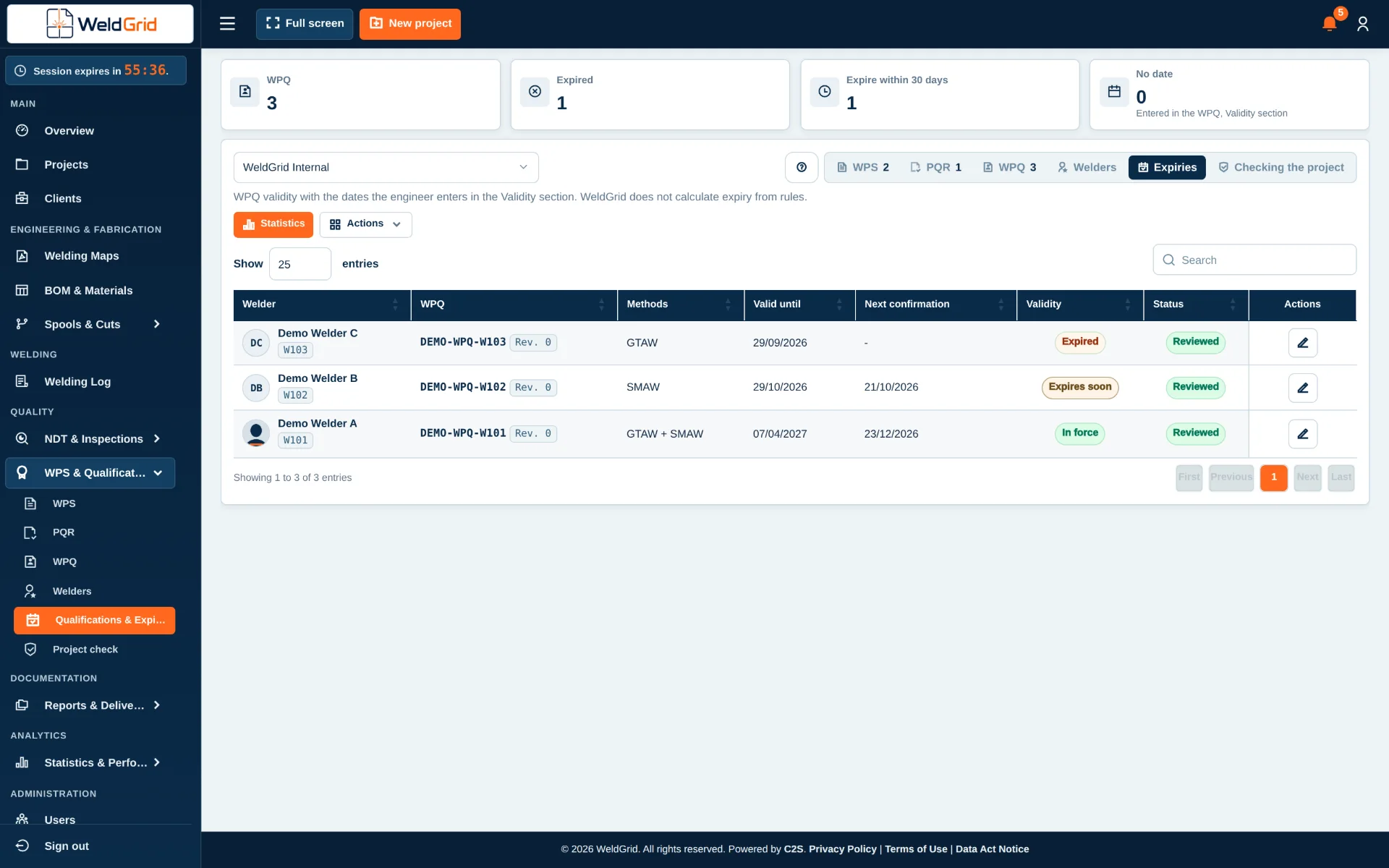
- Management of Welder Performance Qualifications (WPQ) and related welder records
- Linking applicable WPS, PQR and WPQ records to projects, welds and welding activities
- Monitoring of qualification validity, continuity and expiry dates according to configured requirements
- Alerts for documents or qualifications approaching expiry
- Visibility of active, expired, superseded and pending records
Welding resources, consumables and equipment
- Management of filler metals and welding consumables, including type, classification, batch or lot and certificate records
- Management of shielding, purging and other welding gases, including type, batch or cylinder information where applicable
- Tracking of consumable receipt, issue, allocation and usage according to the configured workflow
- Management of welding machines and related equipment
- Tracking of equipment identification, status, allocation and calibration or inspection due dates
- Alerts for consumables, certificates, qualifications or equipment records approaching expiry or required renewal
Who it is for
- Welding Engineers
- QA/QC Departments
- Welding Coordinators
- Fabrication Managers
- Store & Material Controllers
- Equipment & Calibration Coordinators
- Project Managers
Key benefits
- Centralized WPS, PQR and WPQ management
- Faster identification of valid and applicable welding records
- Early visibility of qualification, certificate and calibration expiry dates
- Traceability of filler consumables, gases and welding resources
- Better allocation and status control of welding machines and equipment
- Stronger connection between welding execution, personnel qualifications, procedures and resources
- More complete welding quality records and handover documentation
Questions and answers
Can users create and manage WPS records in WeldGrid?
Yes. The module supports the creation and management of WPS records.
- Linked to PQRs. Each WPS is connected with its supporting PQRs.
- Linked to projects and welds. The applicable WPS is connected with the projects and welds it covers.
- Clear status. Active, superseded and pending records are easy to tell apart.
Can PQR and WPQ records be managed in the same module?
Yes. PQR, WPQ and related welder qualification records are kept together and associated with the relevant welding requirements.
- PQR. Procedure Qualification Records supporting each WPS.
- WPQ. Welder Performance Qualifications and related welder records.
- Validity. Continuity and expiry are monitored according to the configured requirements.
Can WeldGrid show what is expiring?
Yes. Configured due dates are monitored, with visibility of records approaching expiry or already expired.
- Qualifications. Validity, continuity and renewal dates.
- Certificates. Certificate dates of consumables and other records.
- Equipment. Calibration and inspection due dates.
- Alerts. Early warnings before a record expires.
Can filler consumables and gases be traced?
Yes. Consumables and gases are managed with the classification, batch, lot, cylinder and certificate information available in the project workflow.
- Filler metals and consumables. Type, classification, batch or lot and certificate records.
- Gases. Shielding, purging and other welding gases, with batch or cylinder information where applicable.
- Usage. Receipt, issue, allocation and usage according to the configured workflow.
Can welding machines be managed?
Yes. Welding machines and related equipment are tracked by identification, status, location or allocation.
- Identification and status. Each machine is recorded with its current status.
- Location and allocation. Where each machine is and what it is allocated to.
- Calibration. Calibration or inspection due dates where applicable.
Can these records be linked to individual welds?
Yes. Procedures, qualifications, consumables and equipment records are connected to the relevant project and welding records according to the configured workflow.
- Authorized. Which WPS and which qualified welder covered each weld.
- Resourced. Which consumables, gases and equipment were used.
- Traceable. A clear record of how each welding activity was authorized and resourced.
06
Digital Quality Control & Inspection Management
NDT Management & Inspection Tracking
Manage the complete ITP-driven NDT and inspection workflow in one place, from identifying the required inspections and selecting the applicable items to issuing requests, receiving reports, updating project logs and tracking outstanding actions.
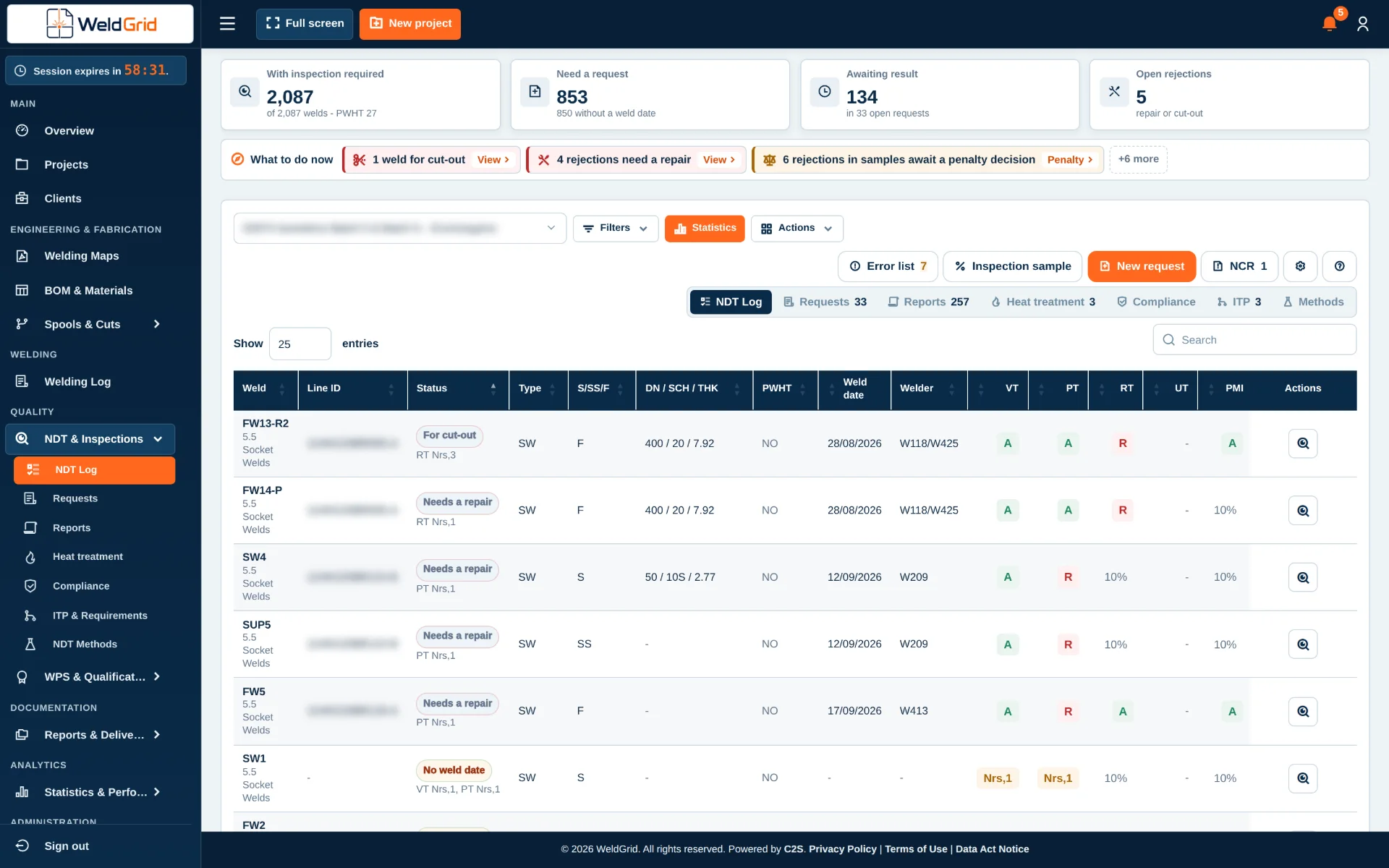
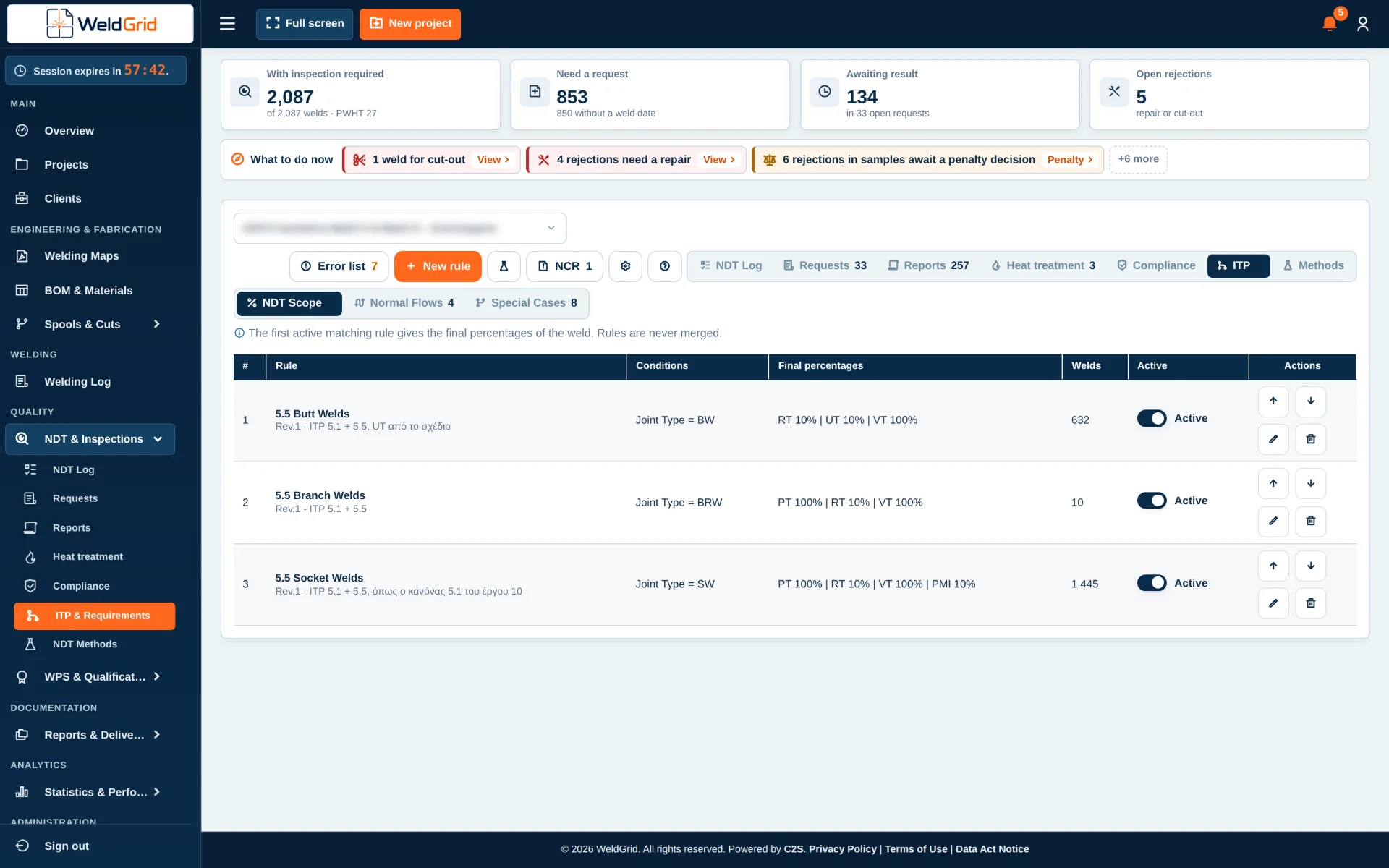
The NDT Management & Inspection Tracking module connects inspection activities directly to the Inspection & Test Plan (ITP) of the project. The user defines the applicable ITP and its inspection requirements, and WeldGrid uses that information to identify the inspections required throughout the project.
When an inspection requirement is percentage-based, eligible welds or project items can be selected randomly by the system, or the user can select them manually. WeldGrid then generates and manages the Requests for Inspection (RFI) and NDT Requests, and the returned results update the relevant inspection, weld and quality logs.
- ITP
- Required inspection
- Sampling and selection
- Inspection request
- Inspection
- Report
- Result
- Log update
- Follow-up
What it covers
- ITP-driven inspection management based on the Inspection & Test Plan defined for each project
- Automatic identification and generation of the required inspection activities
- Tracking of inspections against welds, joints or project components
- Management of NDT methods such as VT, RT, UT, MT and PT, as well as other project-specific inspection activities
- Percentage-based inspection and sampling management according to the ITP
- Automatic random selection of inspection items when a percentage-based requirement applies
- Manual selection from the eligible welds, joints or components when required
- User-defined preferences for how percentage-based selections are generated
- Automatic generation and management of Requests for Inspection (RFI) and NDT Requests
- Tracking of planned, requested, pending and completed inspections
- Collection and management of the corresponding NDT and inspection reports
- Recording and monitoring of inspection results and acceptance status
- Updating of the relevant inspection, weld and quality logs from the received results
- Identification and follow-up of failed or rejected inspections
- Management of re-inspections, repairs and outstanding inspection actions
- NDT progress, coverage and outstanding inspection visibility within the project
Who it is for
- QA/QC Departments
- NDT & Inspection Teams
- Quality Engineers
- Welding Engineers
- Inspection Coordinators
- Project Managers
- Site Managers & Supervisors
Key benefits
- ITP-driven automation that derives the required inspections from the project ITP
- Percentage-based requirements applied without building inspection lists by hand
- Flexible sampling, random by the system or manual by the user
- One connected process from requirement to report, result and follow-up
- Less repetitive updating between inspection activities, reports and logs
- Complete traceability between ITP requirements, welds, requests, reports and results
- Inspection and quality logs aligned with the latest received results
- Clear view of coverage, completed work, outstanding requirements and failed inspections
Questions and answers
How are inspection requirements generated in WeldGrid?
Inspection requirements are derived from the project-specific Inspection & Test Plan (ITP) defined by the user.
- ITP per project. The user defines the applicable ITP and its inspection requirements.
- Automatic identification. WeldGrid identifies the inspections that need to be performed.
- No manual lists. ITP requirements no longer have to be turned by hand into separate inspection lists and spreadsheets.
Can the ITP be different for each project?
Yes. Inspection requirements are defined according to the ITP of each individual project.
- Per project. Each project keeps its own ITP and inspection requirements.
- Applied consistently. The requirements apply the same way to all welds, joints and components of that project.
How does percentage-based inspection work?
When the ITP requires a defined inspection percentage, WeldGrid identifies the applicable population and calculates the required number of inspection items.
- Population. The eligible welds, joints or components are identified.
- Required number. Calculated according to the configured requirement.
- Selection. Random by the system or manual by the user, according to the project preference.
Can WeldGrid select the welds automatically for percentage-based inspection?
Yes. The system performs a random selection from the eligible welds or other applicable project items, when the user selects this workflow.
- Random sampling. Applied automatically when a percentage-based requirement applies.
- User preferences. The user defines how percentage-based selections are generated and managed.
Can the user choose the items manually instead?
Yes. Depending on the configured project preference, the user selects the required items from the eligible inspection population.
- Eligible items only. The selection is made from the welds, joints or components that the requirement covers.
- Same workflow. Manually selected items continue to requests, reports and log updates like any other.
Can the system generate Requests for Inspection and NDT Requests?
Yes. Once the required inspections and the inspection items are identified, WeldGrid generates and manages the corresponding Requests for Inspection (RFI) and NDT Requests.
- Generated automatically. Based on the applicable inspection requirements.
- Company forms. NDT requests are prepared on the approved forms of the company.
- Tracked. Planned, requested, pending and completed.
Can I track the status of an inspection request?
Yes. Inspection requests are monitored through their lifecycle.
- From creation to completion. Creation, submission, execution, report receipt and completion.
- At a glance. Planned, requested, pending and completed inspections are visible at any time.
Can inspection reports be associated with the original request?
Yes. The corresponding NDT or inspection report is associated with the relevant inspection request.
- Request. The report is linked to the request it answers.
- Item. It is also linked to the underlying weld, joint, component or project item.
Do returned inspection reports update the project logs?
Yes. The results received through the reports are recorded against the relevant project records.
- Inspection logs. Updated with the received results.
- Weld logs. Each weld shows its inspection status and results.
- Quality logs. Aligned with the latest received inspection results.
Can I see which welds have been inspected?
Yes. Inspection records are associated with the relevant welds or project components.
- Status per weld. The inspection status and the results of every weld can be monitored.
- Coverage. It is clear how much of the required inspection has been performed.
What happens when an inspection fails?
The result is recorded against the relevant project item and followed as an action, according to the project workflow.
- Repair. The item is followed up until it is repaired.
- Further review. When the result needs a closer look.
- Re-inspection. The new inspection is tracked until the item is accepted.
Can I monitor NDT progress per project?
Yes. NDT activities are monitored at project level.
- Coverage. How much of the required inspection has been performed.
- Results. Completed inspections and their results.
- Outstanding actions. Open requests, failed inspections and outstanding requirements.
07
Digital Welding Quality & Heat Treatment Management
Preheat & PWHT Management
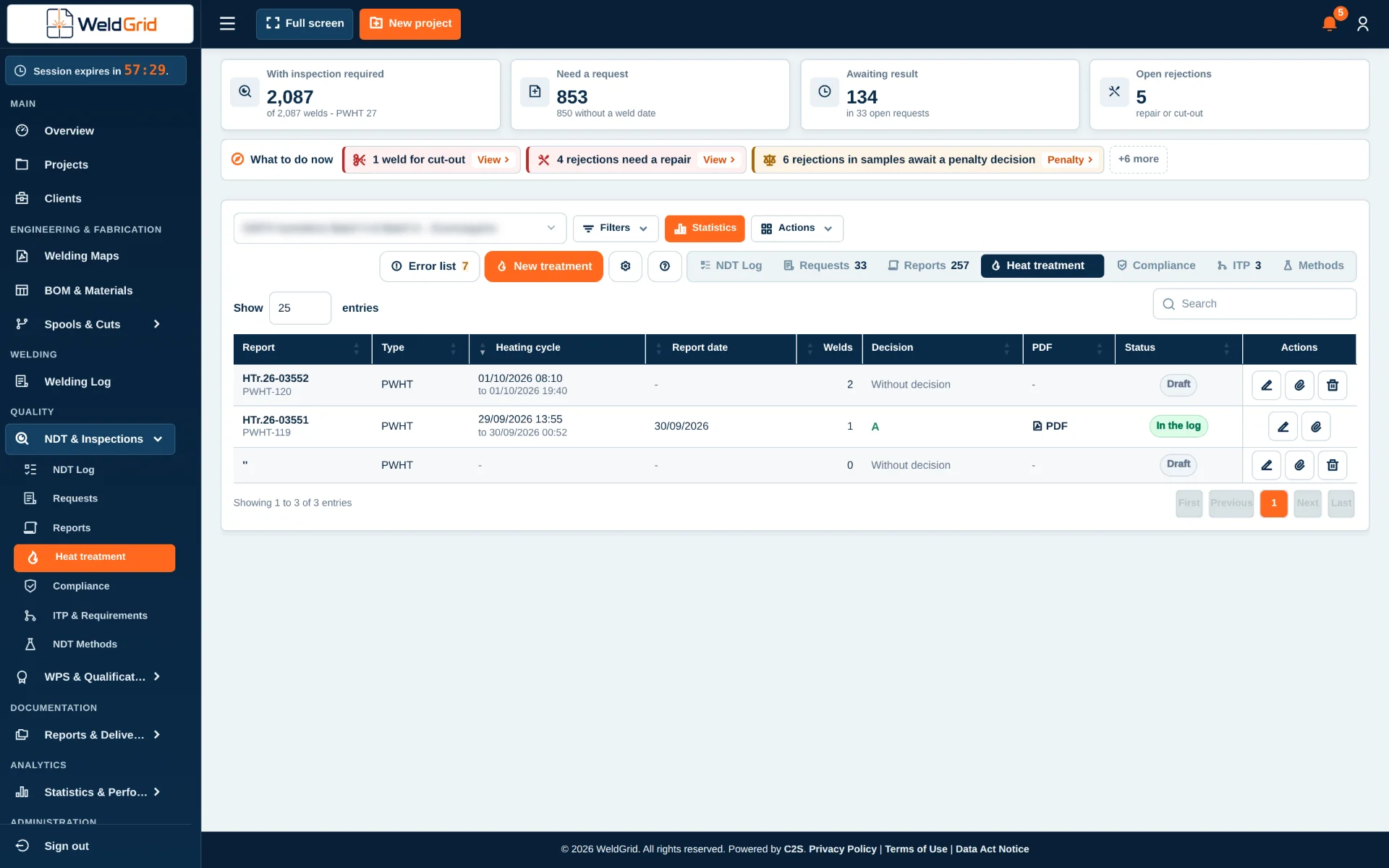
Manage and trace preheat and PWHT activities from requirement and deadline monitoring through report receipt, log updates and final acceptance.
Preheat and PWHT records must remain connected to the exact welds or components to which they apply, while project teams also need clear visibility of outstanding work and time-sensitive requirements. The Preheat & PWHT Management module identifies the applicable items, organizes planned and completed activities and provides actionable lists of what must be preheated or heat-treated.
Configurable alerts can highlight approaching project- or procedure-defined deadlines, including cases where an item risks exceeding an allowed waiting period before PWHT and may require NCR action. After the activity, the returned report and chart are linked to the original record and the reported values update the relevant logs.
- Requirement
- Due-date monitoring
- Preheat or PWHT
- Report upload
- Value verification
- Log update
- Acceptance
What it covers
- Management of preheat and PWHT requirements per weld, joint, spool or component
- Traceability of planned, in-progress and completed heat-treatment activities
- Lists of welds or items requiring preheat or PWHT
- Alerts for approaching project- or procedure-defined time limits
- Identification of items at risk of exceeding the maximum waiting period before PWHT and requiring NCR action
- Recording of applicable parameters, dates, status and results
- Upload and management of returned preheat and PWHT reports or charts
- Association of each report with the relevant weld, joint, spool, component or record
- Update of the corresponding preheat, PWHT, weld and quality log values from the returned report data
- Traceability from requirement and execution through report receipt, log update and final acceptance
Who it is for
- QA/QC Departments
- Welding Engineers
- PWHT Coordinators
- Heat Treatment Teams
- Fabrication Supervisors
- Project Managers
Key benefits
- Complete traceability of preheat and PWHT activities
- Actionable lists of items requiring treatment
- Early warnings for approaching configured deadlines
- Direct connection between treatments, returned reports and project logs
- Reduced duplicate data entry and fewer transcription errors
- Better control of outstanding, completed and non-compliant activities
- More consistent quality records and handover documentation
Questions and answers
Can the module show which items require PWHT?
Yes. It generates and maintains lists of welds, joints, spools or components with outstanding preheat or PWHT requirements.
- Actionable lists. What must be preheated or heat-treated.
- Status. Planned, in-progress and completed activities.
Can WeldGrid warn users before a PWHT deadline is exceeded?
Yes. Alerts are based on the time limits defined by the applicable project, procedure or user configuration.
- Approaching deadlines. Early warnings before a configured time limit is reached.
- Waiting period. Items at risk of exceeding the maximum waiting period before PWHT are highlighted.
Can PWHT and preheat reports be uploaded after completion?
Yes. Returned reports or charts are uploaded and associated with the corresponding heat-treatment record and project item.
- Reports and charts. Uploaded back into the module after the activity.
- Linked to the original record. Each weld, joint, spool or component keeps its evidence.
Do the returned reports update the logs?
Yes. The values recorded in the returned reports are verified and used to update the corresponding logs.
- Verified values. The reported values are checked before the update.
- Updated logs. Preheat, PWHT, weld and quality logs.
- Continuity. From the requirement and the performed treatment to the returned evidence and the final project record.
What happens if a configured time limit is exceeded?
The item is highlighted for review and managed according to the non-conformance and NCR workflow of the project.
- Highlighted. The item stands out for review.
- NCR workflow. It follows the non-conformance process the project has defined.
08
Quality records & handover
Reports, deliverables & analytics
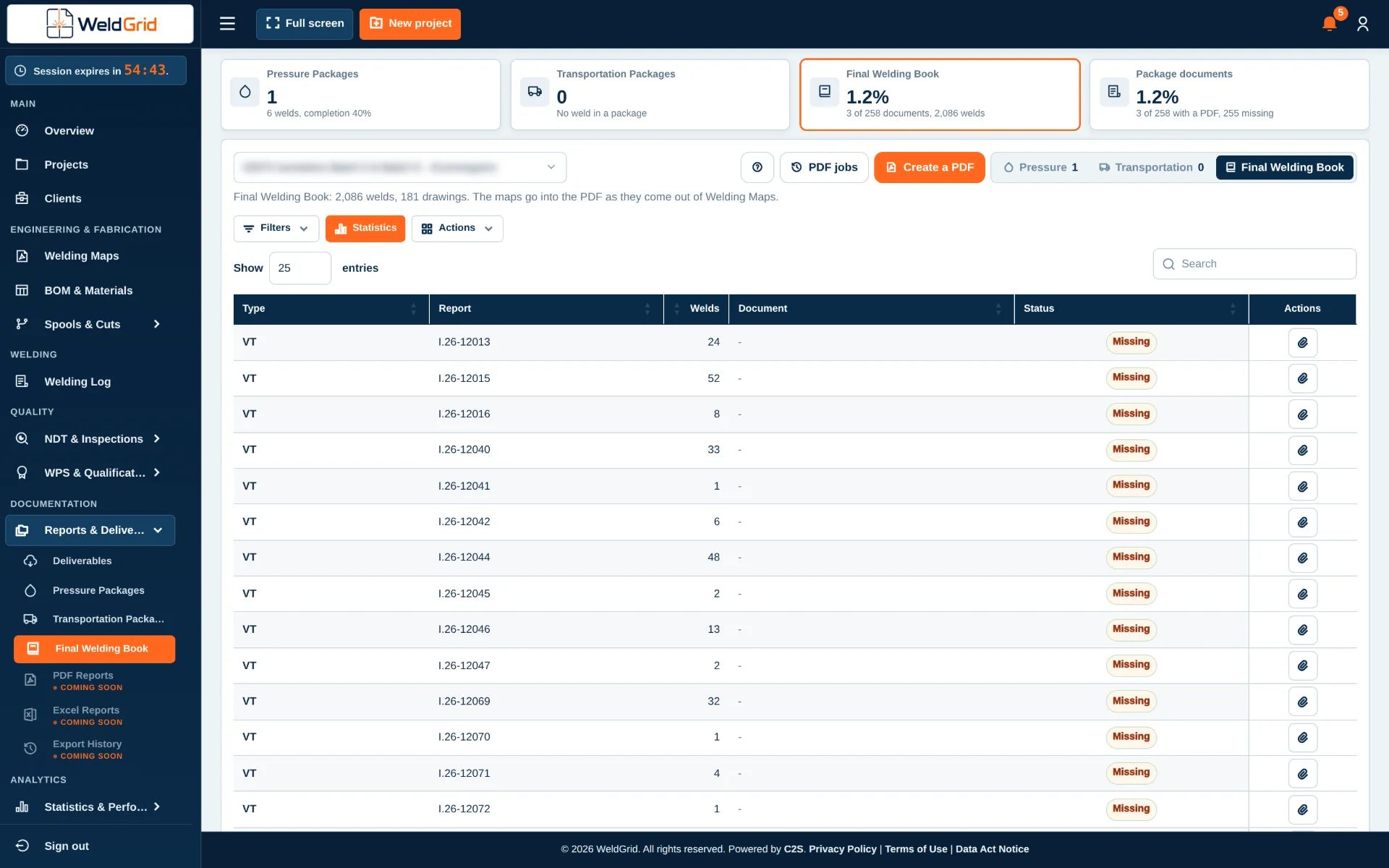
Deliverables, Pressure Packages, Spool Transportation Packages and the Final Welding Book are prepared from the same records the team works on every day, so the handover reflects the latest data.
- Deliverables per project
- Pressure Packages
- Spool Transportation Packages
- Final Welding Book
- Export into your own company Excel templates
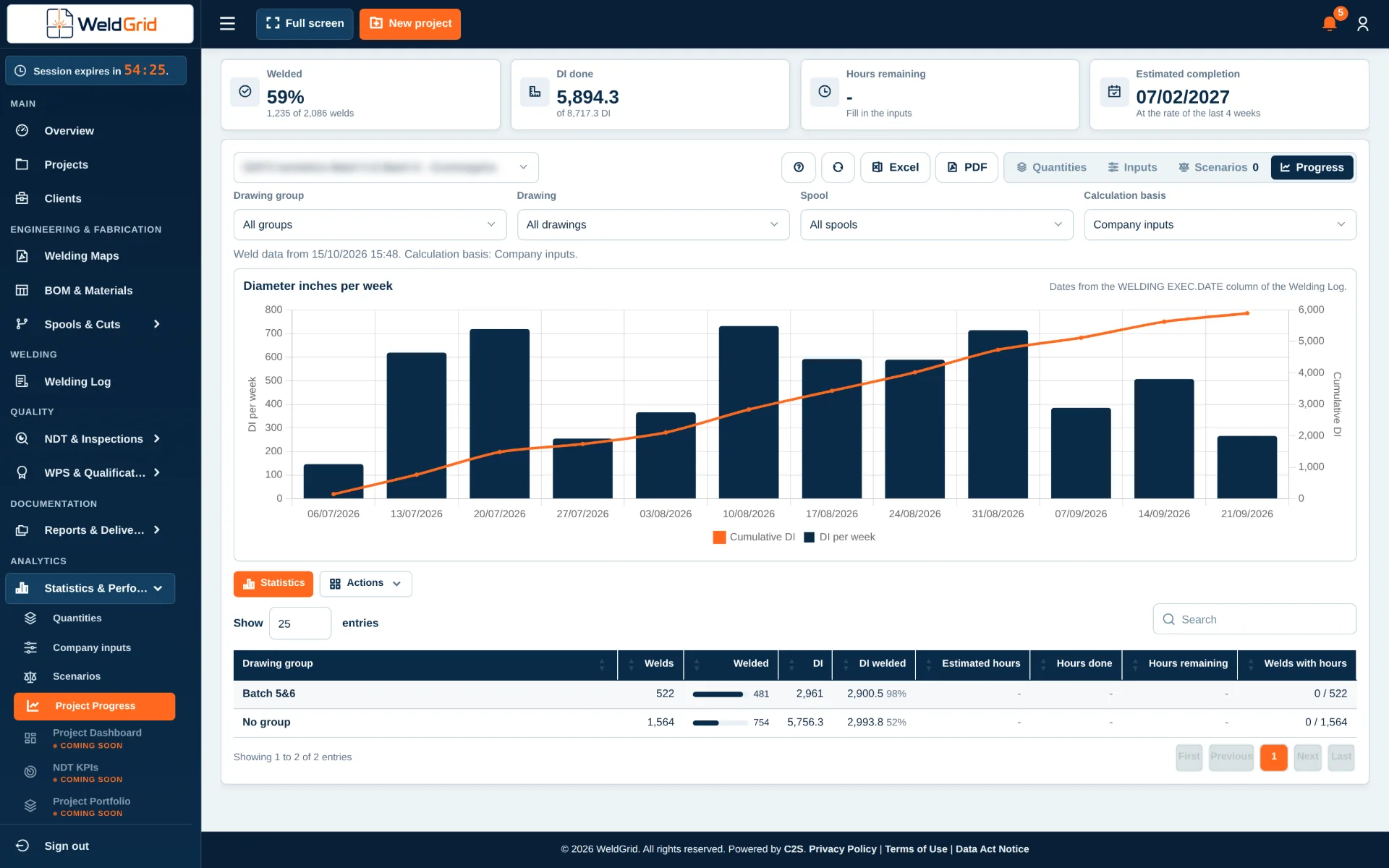
- Quantities and project progress
- Production and quality KPIs
- Company parameters and scenarios
Book a demo
See every module on your own project
Book a demo and see how WeldGrid connects drawings, materials, welds, inspections and handover. Or write to us at info@weldgrid.gr.